Get the most out of sTV on Plex.
Quick, step-by-step answers for the things people ask me most — protecting your privacy, putting your favorite libraries up front, and fixing a Plex app that's acting up.

You shouldn't ever need to pay to watch sTV. If Plex asks you to buy a Remote Watch Pass or Plex Pass to play something from sTV, don't buy anything — message me first and I'll sort it out.
Privacy
Stop Plex from selling or sharing your data
In March 2025 Plex started showing everyone a consent prompt. A lot of people clicked “I Agree” thinking Plex would stop working otherwise. It won't.
“For Plex accounts created before March 20, 2025, we require your consent to sell your personal data as described in our Privacy Policy. You can adjust your share/sell preferences here.”— The prompt Plex showed
- Sign in to Plex in a web browser
Go to app.plex.tv on a computer or phone browser and sign in with your Plex account.
- Open Plex's Opt-Out Choices page
Go to plex.tv/vendors-us. Stay signed in so the choices are saved to your account.
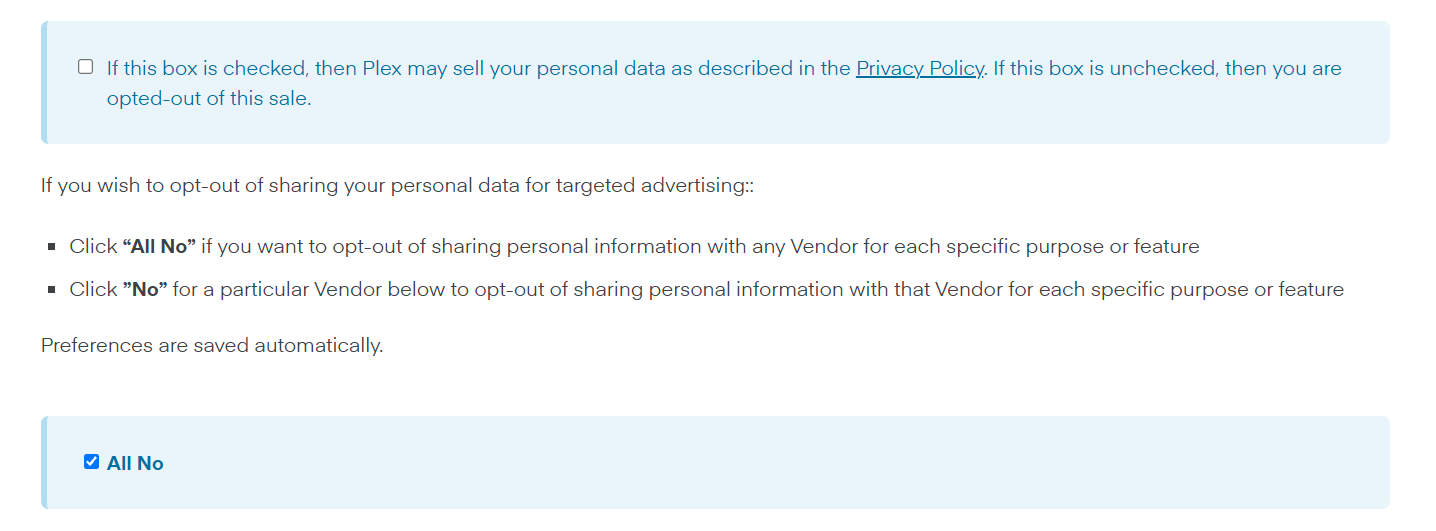
- Uncheck the “sell your personal data” box
The first box reads “If this box is checked, then Plex may sell your personal data…”. Make sure it's unchecked — unchecked means you're opted out.
- Check “All No”
This turns off sharing your info with every advertising partner at once.
- That's it
The page says “Preferences are saved automatically.” No save button needed.
Where is this inside Plex's settings?
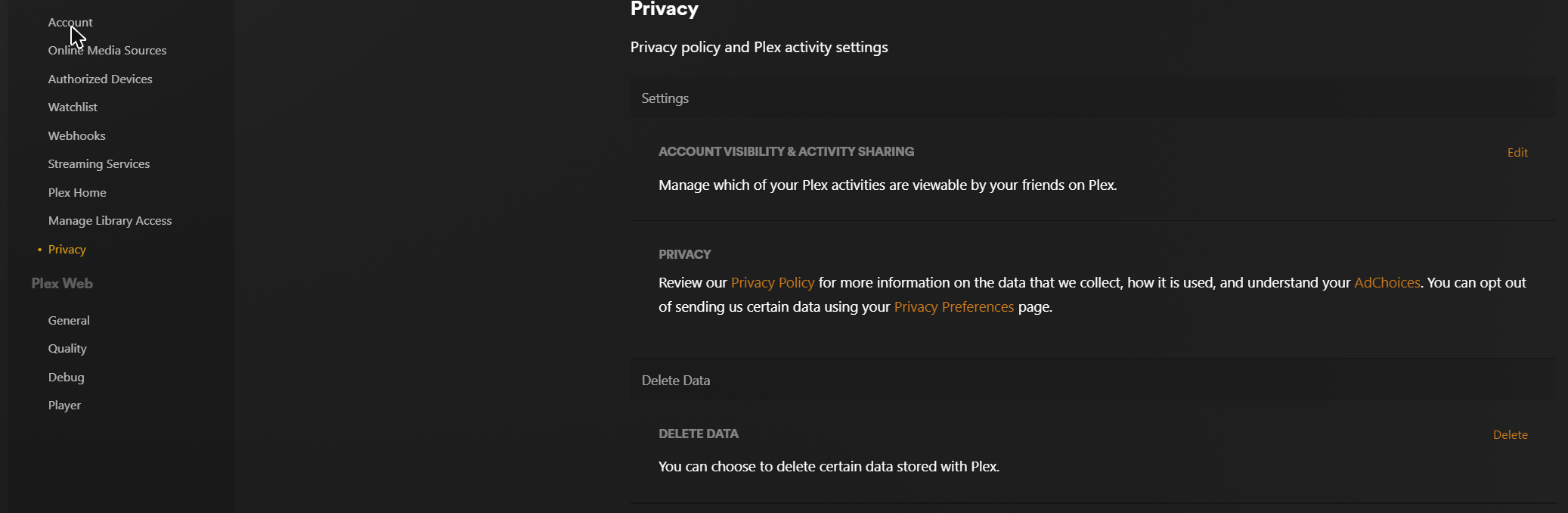
Click your profile picture → Account Settings → Privacy. That page links to Plex's privacy preferences and also lets you control what your Plex friends can see about your activity (Account Visibility & Activity Sharing → Edit).
Customize
Pin & reorder your libraries
Plex mixes in its own free movies, live TV and other stuff. Pinning sTV's libraries and moving them to the top means your Home screen opens right to the good stuff.
iPhone, iPad & Android
Everything happens in the sidebar's Edit mode.
- Open the sidebar
In the Plex app, tap the menu (☰) at the top-left to open the sidebar.
- Tap Edit
Tap Edit at the top of the sidebar.
- Pin what you want
Pin the sTV libraries you use (Movies, TV Shows…) and unpin anything you don't. Don't see one? Tap More to find unpinned libraries.
- Drag to reorder
Drag the ≡ handle next to each library up or down. Whatever is at the top of the list shows up first on Home.
- Tap Done
Your Home screen updates right away.
Fire TV, Android TV / Google TV, Apple TV & Smart TVs
TV apps use the same sidebar — you just drive it with the remote.
- Open the sidebar
Press Left on the remote until the sidebar slides out.
- Open the item's menu
Highlight a library and select the ⋮ next to it (or choose Edit at the top of the sidebar).
- Pin or unpin
Choose Pin / Unpin. Libraries that aren't pinned are under More +.
- Reorder
Choose Reorder, move the library with Up/Down, then press Select to drop it in place.
Plex in a web browser
At app.plex.tv on a computer.
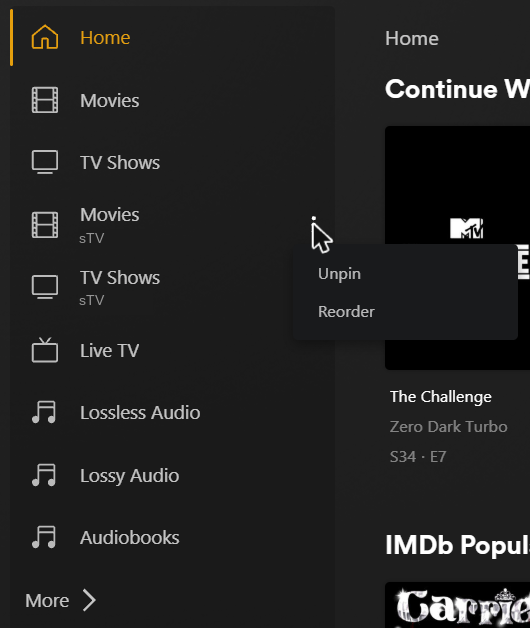
- Hover over a library in the sidebar
A ⋮ appears to the right of its name. Click it.
- Choose Unpin or Reorder
Unpin hides a library from the sidebar and Home. Reorder lets you move things around.
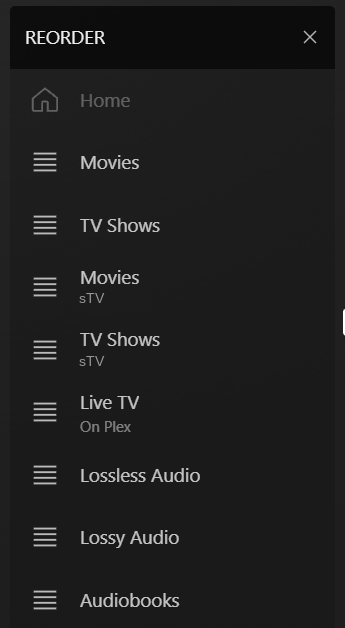
- Drag to reorder
In Reorder mode, drag the ≡ handles to put sTV's libraries where you want them, then click the × at the top.
- Pin something back
Click More › at the bottom of the sidebar, find the library under sTV, and click the pin icon next to it.
Roku
Roku's remote has a ★ button that opens the options menu.
- Highlight the library
Open Plex and move to the library in the sidebar.
- Press ★
Press the ★ button on the remote.
- Pin or reorder
Choose Pin / Unpin, or Reorder and move it with the arrow buttons, then press OK.
Quick fix
Restart (or fully close) the Plex app
Just like rebooting a computer, fully closing Plex clears out whatever got stuck. Try this first when video buffers, the app freezes, or new shows aren't showing up. Pick your device:
Quick restart
- Restart the Roku
Settings → System → Power → System restart, then choose Restart.
- Open Plex again
Roku apps don't have a separate close button, so a system restart is the cleanest reset.
Still acting up? Reinstall
- Remove Plex
On the Home screen, highlight Plex, press ★ and choose Remove app.
- Restart the Roku
Settings → System → Power → System restart.
- Add Plex back
Search → “Plex” → Add app, then sign in again.
Force-stop Plex
- Open app settings
Settings → Applications → Manage Installed Applications → Plex.
- Force stop
Choose Force stop, then open Plex again.
Still acting up?
- Clear the cache
Same screen → Clear cache.
- Restart the Fire TV
Settings → My Fire TV → Restart (or hold Select + Play/Pause for 5 seconds).
- Last resort
Clear data resets Plex completely — you'll have to sign in again.
Force-stop Plex
- Open app settings
Settings → Apps → See all apps → Plex.
- Force stop
Choose Force stop, then reopen Plex from Home.
Still acting up?
- Clear the cache
Same screen → Storage & cache → Clear cache.
- Restart the TV/box
Settings → System → Restart.
- Last resort
Clear storage / data resets Plex — you'll need to sign in again.
Close Plex
- Open the app switcher
Double-press the TV / Home button on the remote.
- Swipe Plex away
Move to Plex and swipe up on the touchpad. Reopen it from Home.
Still acting up?
- Restart the Apple TV
Settings → System → Restart.
- Reinstall
Press and hold Plex on the Home screen → Delete App, then reinstall it from the App Store and sign in.
Close Plex
- Force-close
Press and hold the Back / Return button until you're back at the TV's Home screen.
- Reopen
Launch Plex again from the Apps row.
Still acting up?
- Cold restart the TV
With the TV on, hold the Power button on the remote until the TV turns off and back on.
- Reinstall
Delete Plex from Apps settings and reinstall it from the Samsung app store.
Close Plex
- Leave the app
Press Home and open another app or input. On newer TVs, open the recent-apps view and close Plex there.
- Wait and reopen
Give it about 10 seconds, then launch Plex again.
Still acting up?
- Power-cycle the TV
Turn the TV off, unplug it for 30 seconds, plug it back in.
- Reinstall
Remove Plex and reinstall it from the LG Content Store / Apps.
iPhone & iPad
- Open the app switcher
Swipe up from the bottom of the screen and pause in the middle.
- Swipe Plex up and away
Then reopen it from the Home screen.
Android
- Force stop
Press and hold the Plex icon → App info → Force stop.
- Clear cache if needed
Storage → Clear cache, then reopen Plex.
Troubleshooting
Something not working?
Tap a problem to see what to try.
Video keeps buffering or stuttering
Try these in order. The first ones give the best picture and are easiest on my server.
- Use Original quality. In the player's quality menu, pick Original (or Maximum). This plays the file exactly as it is, with no extra work for the server. To make it the default, set Internet Streaming / Remote Quality to Original/Maximum in the app's settings (in a browser: profile picture → Account Settings → Quality).
- Give it a better connection. Plug the TV or streaming box into Ethernet, or move it closer to your router. A quick test at fast.com helps: about 25 Mbps or more handles HD, 50 Mbps or more for 4K.
- Restart the Plex app and the device.
- Last resort: lower the quality. On a slow connection (hotel Wi-Fi, phone data), picking 8 Mbps or 4 Mbps will stop the pausing, but it makes my server convert the video while you watch. Switch back to Original when you're on a good connection.
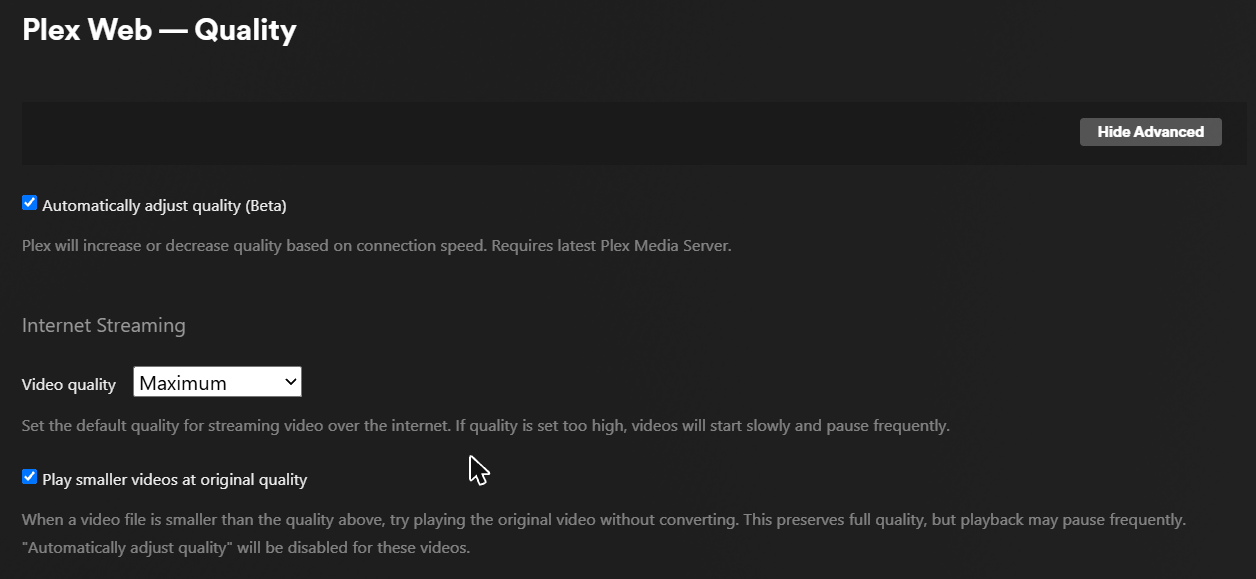
Plex Web → Quality. Maximum is what you want — it plays the original file.
sTV says “unavailable” or my libraries disappeared
- Make sure you're signed in to the same Plex account I shared sTV with — check the profile picture in the top corner.
- Check the sidebar's More section — the libraries may just be unpinned (see Pin & reorder).
- Sign out of Plex on that device and sign back in.
- If it's unavailable on every device, the server may be down for maintenance — let me know.
Plex is asking me to pay or buy a Remote Watch Pass
A new movie or episode isn't showing up
Where's the music?
Still stuck? Do a fresh start
- Fully close Plex and reopen it (how).
- Sign out of Plex on the device and sign back in.
- Restart the TV, streaming stick or phone.
- Unplug your router for 30 seconds and plug it back in.
- If you use a VPN, turn it off and try again.
Support
Need a hand?
Send me a message and I'll get back to you. The more you tell me, the faster I can fix it.
- Goes straight to me — no account needed
- Tell me which device you're using
- Attach a photo or screenshot of any error
Message sent
Thanks! I'll get back to you soon.